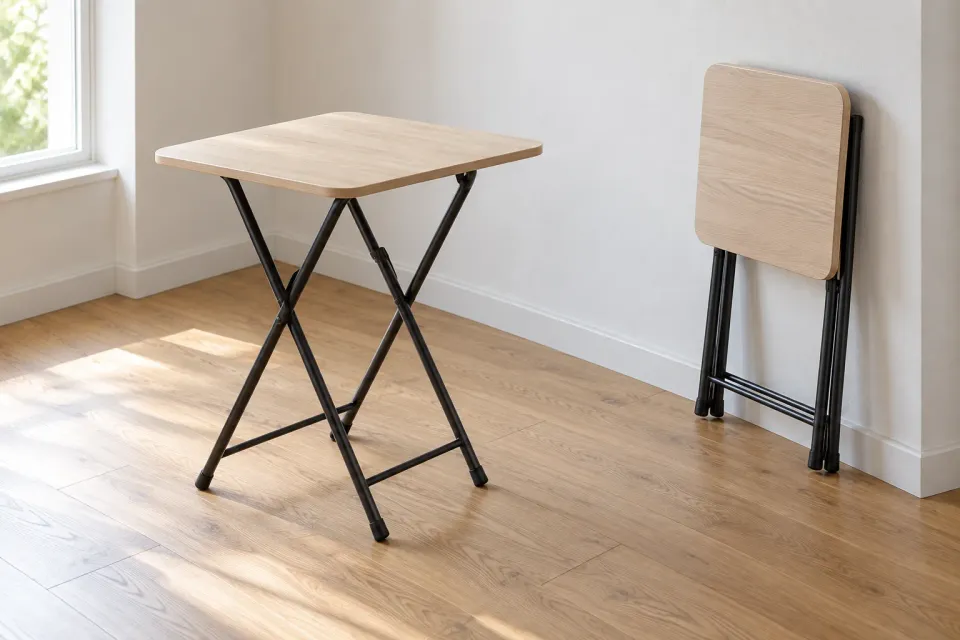
A shopper follows a paid ChatGPT ad for a folding table. The destination opens with an attractive room, another angle of that room, and a close photograph of the tabletop. None shows the table folded. The shopper can recognise the style but still cannot inspect the reason for clicking.
This hypothetical example illustrates an image sequence with plenty of photography and little decision support. Useful sequencing follows the questions behind the purchase: is this the advertised item, does it solve the stated problem, will it fit my situation, and what limitation should I understand? Individual images can do different jobs. The series needs to answer the important questions without making the visitor interpret repeated decorative views.
Write the buying reason before choosing photographs
Put the ad’s main proposition at the top of the photography brief. Then describe the visible evidence needed to assess it. A product advertised for narrow spaces needs context for its footprint. A bag promoted for organised packing needs views of its compartments and how they are accessed.
OpenAI’s Campaign Management documentation describes ad content and destinations. The editorial task here begins when someone follows that destination: the pictures should continue the same offer. The broader ChatGPT ads landing-page guide covers the page’s overall promise and action. This review is specifically about the visual evidence supporting a product choice.
Distinguish a feature the image can demonstrate from a claim requiring separate evidence. A photograph can show that a pocket exists. It cannot establish how many years that pocket will withstand use. A carefully ordered gallery still needs appropriately supported product information alongside it.
Build a question chain for this particular item
Recognition, function, fit and limitations provide a useful starting sequence. This is an editorial method, not a mandatory layout. When someone buys a replacement part, its connector and identifying details may deserve attention before a lifestyle scene. For a decorative object, appearance in context may be more relevant than a functional demonstration.
Give every proposed image a working caption such as “identify the selected variant” or “show the clearance required in use”. Record the decision that answer enables. Two images may answer the same broad question, but the editor should be able to explain the additional information supplied by the second.
Keep a significant qualification close to the feature it affects. If a detail exists only on the larger model, say so where that detail appears. A general note far below the gallery can leave the customer with a mistaken impression long before they reach the explanation.
A hypothetical sequence for a folding table
Suppose a retailer’s ad highlights the ability to regain floor space when a table is not in use. The team has verified the actual model before planning the photography. Their image brief could look like this:
| Customer question | Image task | Context needed |
|---|---|---|
| Is this the advertised table? | Show the complete selected model | Match the product and variant |
| What does folding mean here? | Show the open and folded states | Identify each state clearly |
| Will it fit my room? | Present the relevant space and dimensions | Explain measurement boundaries |
| What must I provide? | Show any support or storage requirement | Identify what is included |
This is a planning example, not a specification for a real product. If the actual table requires a component to be removed before folding, that fact should shape the presentation. A photograph of the final folded state alone could otherwise suggest a simpler process than the product supports.
Detailed dimension artwork has its own requirements. Use the dimension-diagram guide to decide which distances need labelling. The sequence establishes when dimensional evidence becomes relevant; it does not replace checking the measurements themselves.
Four questions shape the image sequence
- 1. Recognise
Show the complete advertised model and correct variant.
Checkpoint - 2. Understand operation
Connect the open and folded states clearly.
Checkpoint - 3. Assess the space
Show dimensions and the space required in use.
Checkpoint - 4. See the conditions
Explain support, storage and accessories affecting the choice.
Use captions to resolve what a picture leaves open
A useful caption adds information the photograph cannot establish by itself. Explain when a room scene contains two units but the listed offer contains one. Identify accessories used to demonstrate a product when they are purchased separately. Repeating the product name under every image contributes little to the decision.
Check what a crop removes from view. A close photograph can clarify a hinge while hiding a support arm required for operation. If the relationship matters, show the wider view first or place it directly beside the detail. The customer should not need to assemble the product’s mechanism from disconnected fragments.
Colour needs particular care. Photographs of the same variant in different settings should not imply that each is a separate colour option. The colour-confidence guide covers representation and uncertainty. For sequencing, ensure the viewer can tell when the series changes variant or photographic conditions.
Review evidence order before gallery controls
This sequence concerns the information itself. Arrows, swiping, thumbnails and enlargement determine how visitors reach it. A technically convenient gallery cannot supply a missing view, while a strong selection can still be hard to inspect if the gallery is awkward to use.
Start with a plain contact sheet containing all images and captions. Ask a colleague to describe the important product features without first reading the campaign brief. Record which conclusions follow from visible evidence and which are guesses. This is an editorial review, not a measured usability study or proof of improved sales.
Remove redundant photographs only after understanding their job. A second angle that appears repetitive to the designer may reveal a handle, opening or underside that changes the purchase decision. Conversely, three attractive room scenes can all leave the same essential question unanswered.
Preserve the sequence as the catalogue changes
OpenAI’s Product Feeds documentation describes using product data for ads and reviewing product images and destination URLs. Treat the relationship between the advertised item and the destination’s image series as a concrete review point.
Keep a short record of each image, its variant, the question it answers and its source. If a supplier changes a construction detail or replaces a photograph, that record reveals which answer needs checking again. Review translated captions too, particularly where included and optional components could be confused.
Complete the selection when every material buying question has a clear answer or an honestly described uncertainty. Add another photograph when it supplies relevant evidence. The finished sequence should help the visitor from the ChatGPT ad understand both the product’s suitability and the circumstances in which they should choose something else.
Sources and scope
Choose which buying question each product image answers and sequence that evidence for the visitor arriving from a paid ad.
Working methods and examples are editorial suggestions. Check current platform requirements and available features before implementation.