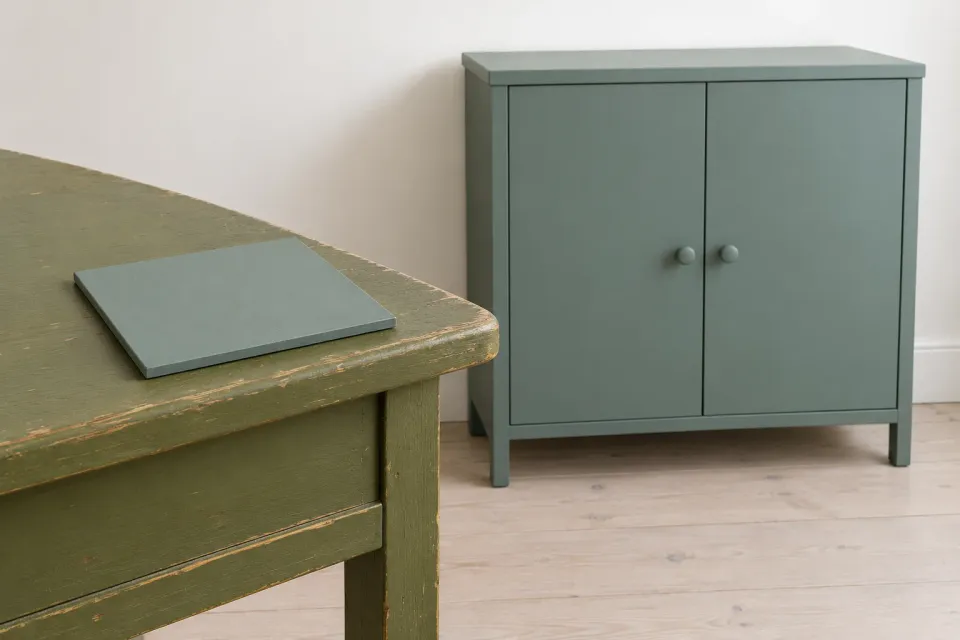
Someone clicks a ChatGPT ad for a green cabinet, then hesitates on the product page. The advertising image looked blue-green; the close-up looks closer to olive. Before adding a general colour disclaimer, establish what needs explaining. Are the images showing different variants, or the same product in different circumstances? Those are different problems with different remedies.
For a paid product ad, colour belongs to the offer the customer is trying to verify. This guide concerns representation and uncertainty on the destination page. Its workflow is an editorial recommendation for the advertiser’s shop, rather than a claim that ChatGPT provides a particular colour-checking feature.
Start with the product represented in the ad
OpenAI’s Campaign Management describes a standard ad as supplying content, an image and a destination. Its Product Feeds guide explains that the selected product supplies the image and destination for product ads. This makes image selection relevant before the click. Neither source establishes that a particular colour representation will be approved or improve advertising performance.
Collect the ad image, the linked product variant and the shop’s original image. Check that they represent the same version. An image of the wrong green variant needs correcting; a sentence saying colours may vary does not resolve that error. Record the product identifier reviewed so a later image replacement does not silently break the connection.
If the name makes it hard to identify the selected version, address understandable variant names first. The decision here is narrower: once the right variant is established, what visual evidence can the customer reasonably use to judge it?
Separate three kinds of uncertainty
Ask three questions during review. Is the product identity certain? Is the context of the image described? Is the available evidence sufficient for the comparison the customer wants to make? The last question matters when someone wants to match an item already at home. A product photograph by itself is not a promise of an exact match with existing furniture.
| Customer question | What to inspect | Appropriate next action |
|---|---|---|
| Is this the same green version? | Variant name, identifier and associated images | Correct the association if it is wrong |
| Why does the surface appear different between images? | Captions and documented photography conditions | Explain the actual difference between the images |
| Will this shade match my cabinet at home? | An available sample or another real checking option | Offer that check and explain its limits |
This is a recommended decision model. It does not assume every shop supplies samples or records photography conditions. If those facts are missing, investigate before writing customer-facing explanations. A confident account invented after the photograph was taken merely creates another uncertainty.
Give the images distinct jobs
Choose an image that clearly represents the advertised variant and a complementary image that answers a specific follow-up question. A room photograph can show the overall appearance. A close-up can show the surface. Two nearly identical room photographs do not automatically give the customer more useful evidence about a shade.
Describe only photography conditions you know. A caption might identify the selected variant in the shop’s sample room, if that is true. Avoid calling a photograph colour-accurate unless you can explain what that means and how the judgement was made. The fact that someone edited the picture is insufficient support for that promise.
Keep visual appearance separate from physical composition. An image that looks metallic does not establish what an object is made from. That belongs in the product material explanation. For the colour decision, identify the surface and show relevant, documented variation without drawing unsupported conclusions about its composition.
A hypothetical cabinet purchase
Suppose a fictional shop advertises a cabinet in a finish called Green 04. The ad shows the whole cabinet; the product page uses that image plus a close-up. A customer wants to place it beside an older green table. The shop has no verified evidence that the two shades are identical.
A suitable draft might read: “The images show Green 04. If you need to match existing furniture, compare our colour sample before ordering.” Use the second sentence only if the shop actually supplies an appropriate sample. The page should then explain how to request it, what it represents and any charge involved.
If samples are unavailable, the next step must be different. A customer could contact someone who can explain the evidence available, without promising that an emailed phone photograph will settle the match. The useful action is the one that addresses the uncertainty preventing this particular purchase.
Which colour question remains after the ad click?
- Wrong variant
Replace the image or fix its association. A colour disclaimer does not resolve an identity error.
- Right variant, unclear image
Describe the known image context and what the close-up contributes.
- A precise match matters
Offer an actual colour sample or another verified way to check.
- Enough evidence to decide
Keep the variant name visible and let the customer proceed to order.
Explain the uncertainty where the choice happens
Place a short colour explanation beside the selector or the image that needs context. A general reservation at the bottom of a page does not tell someone which of several images represents their order. Keep the selected variant clear when the customer opens the gallery and when they return to the purchase button.
Make the level of detail proportionate. Someone choosing between two visibly different colours may only need the correct image and label. Someone seeking a precise match needs more evidence. Providing both routes keeps a straightforward purchase manageable while giving a demanding comparison enough space.
When multiple images are useful, sequencing product photographs helps place overview and detail according to their purpose. Keep a colour explanation attached to the image that requires it. Avoid repeating a generic caption beneath every photograph, which leaves the customer to guess why the views differ.
Review the unresolved question before buying more traffic
Ask a colleague to begin with the ad image and follow the destination URL. Have them identify the variant available to order and explain what remains uncertain. Distinguish an error the team must correct from a choice where the customer needs additional evidence. This review checks the quality of the decision, not a promised conversion outcome.
Record which image, variant and explanation received internal approval. Revisit the combination whenever product photography or the range changes. The customer should finish with three useful things: a clear product identity, a reasonable understanding of what the image represents and a real action to take if the shade still needs checking.
Sources and scope
Explain uncertainty in product colour representation after a paid ChatGPT ad and help customers decide whether to buy, compare or check a shade before ordering.
Working methods and examples are editorial suggestions. Check current platform requirements and available features before implementation.