A successor in your catalogue is not automatically a replacement in the customer’s daily work. The new product may perform the same main task while needing different accessories, more space or a changed routine. A paid ChatGPT ad offering help with a model change needs a destination that makes those differences visible.
Start with what the buyer already owns and needs to preserve. Your team may know every improvement in the new model, but the visitor first needs to know whether existing equipment will still work. A useful replacement page supports three outcomes: suitable, suitable with changes, or unsuitable. The following is an editorial method for making that decision traceable.
Establish the relationship between the two models
Call a product a successor when its manufacturer or your catalogue owner has established that relationship. Use a narrower description when you have simply found something with a similar purpose. Membership of the same category does not prove that one product replaces another.
Record the old model number, the new model number and the evidence for their relationship. Distinguish a spare part from a complete new product and from an upgrade kit. Someone expecting a component should not discover at checkout that your advertisement meant an entire machine.
If the previous model has permanently left the range, its page needs to explain that status. The guide to discontinued products covers the role of that old destination. This article addresses the next decision: under which conditions does the proposed successor work for the same buyer?
Review the things the customer already depends on
List dependencies before writing about new features. Dimensions, consumables, connections, software, existing mounts and operating routines can all matter. Include anything that could make the purchase unusable even when the new model has a stronger headline specification.
Give each dependency an explicit result: unchanged and supported by evidence, changed and explained, or not yet verified. An empty comparison cell must not imply compatibility. Keep the relevant manufacturer document and its version in your internal decision record so another reviewer can reproduce the conclusion.
Order these requirements by their effect on the replacement. A new finish may matter less than losing a working connection to the customer’s business system. The broader product compatibility guide helps gather the evidence. On a replacement page, present that evidence as changes from the particular model the visitor already knows.
A fictional printer shows why the distinction matters
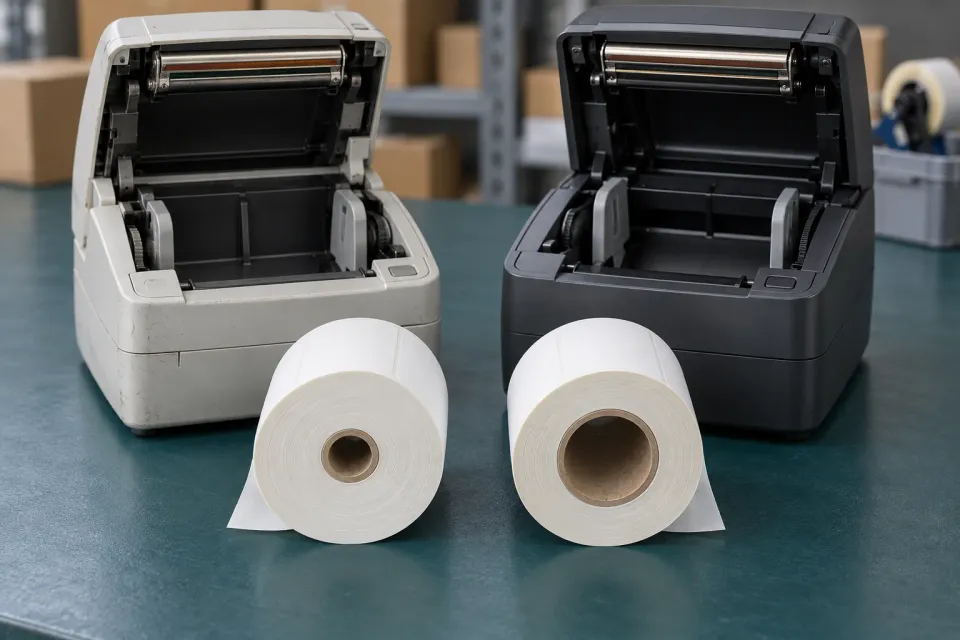
Imagine a retailer advertising the fictional P30 label printer as the successor to P20. Both print labels that are 58 mm wide. However, P30 needs a 40 mm roll core instead of 25 mm, and it does not support the browser extension used with P20. Both models still have a USB connection in this hypothetical example.
The heading “Replaces P20” leaves two purchase conditions unexplained. The buyer may own a cupboard of old rolls and print directly from a browser order system. More useful copy would say: “P30 succeeds P20. You will need new rolls and must check the printing route from your order system.”
Place those differences near the product decision. Distinguish what the purchase includes from what the customer must arrange separately. A general claim about running costs should not hide the need to replace consumables. If the printing route is unknown, provide a way to resolve that question before recommending purchase.
These are invented models illustrating a method. Replace their dimensions and features with verified facts about the actual products. A similar casing or matching connector shape is insufficient evidence that every old accessory or software workflow continues to work.
Can P30 replace the customer’s P20?
- Same label width
Both print 58 mm labels. That requirement passes, but does not settle the replacement.
- Changed consumables
P30 needs a 40 mm roll core instead of 25 mm. Existing rolls cannot be assumed to fit.
- Workflow needs checking
USB remains, but the old browser extension is unsupported. Confirm a working print path.
- Conditional decision
Recommend the switch only after new rolls are accepted and the print workflow is verified.
Match the ad destination to the remaining decision
For a straightforward, documented replacement, the new product page can include a concise explanation of its relationship to the predecessor. When several conditions change, send the ad to a page where the visitor can assess them before buying. That may require model selection and a focused table of changes.
For P30, a hypothetical ad message might invite customers to check rolls and connectivity before replacing P20. This is an illustrative message, not a claim about who would receive the ad. Avoid promising a simple switch when the destination later reveals that an established software workflow has to change.
OpenAI’s Campaign Management documentation describes a standard ad’s content and destination URL. Review that wording together with the actual landing page. Platform documentation cannot establish whether a successor fits a buyer’s equipment; that evidence must come from the responsible product source.
Keep the new model identifiable throughout the catalogue
Do not obscure the change by merely overwriting the old model’s name and photographs. In your own catalogue, the connection between products should remain traceable without merging their identities. The customer needs to see the item number being ordered and the conditions attached to that exact product.
OpenAI’s Product Feeds guide specifies a row for each product item or variant and stable identifiers between uploads. It also explains that the selected product supplies the image and destination for a product ad. Check that the successor’s catalogue entry therefore reaches the intended model, rather than an old page bearing a conflicting name.
Use the broader product-feed guide for the catalogue workflow. Your recorded successor relationship is buying evidence, not confirmation of ad approval or delivery. Inspect variant selection and the cart as well, so a visitor does not silently switch to a different model during purchase.
Make the next action resolve the real uncertainty
When every material requirement is supported, the next step can be purchasing the specified model. Where a known accessory must change, show it alongside the product and let the buyer assess the combined cost. Where a decisive requirement remains unresolved, the next action should be a targeted check.
Request only the information needed to settle it, such as the existing model number and order-system name. Return a bounded answer for that particular combination. If the successor does not fit, say so and open a separate choice of alternatives. A completed replacement decision explains what carries over, what must change and what remains to be checked before the buyer commits.
Sources and scope
Determine whether a named successor fits the previous product’s use by showing retained requirements, changed constraints and remaining checks before purchase.
Working methods and examples are editorial suggestions. Check current platform requirements and available features before implementation.