A product shown in someone’s working day can explain more than a product on a plain background. It can also suggest that a particular business bought it, endorses it or achieved an impressive result. When preparing customer examples in ChatGPT ads, decide which of those interpretations the material can support before choosing the scene.
Separate a demonstration from a documented customer case. A demonstration shows how something could be used in a clearly described situation. A customer case describes an event that actually happened and can be substantiated. Either may be useful, but they require different images, wording and boundaries. The approach below is an editorial method, not a special platform feature.
Decide what the example needs to explain
Start with a question close to the offer. Does this product suit this kind of task? Which components does a user need to handle? What is included when it is used this way? Choose a question for which a concrete situation provides information. A portrait of a smiling person does not automatically make the use case clearer.
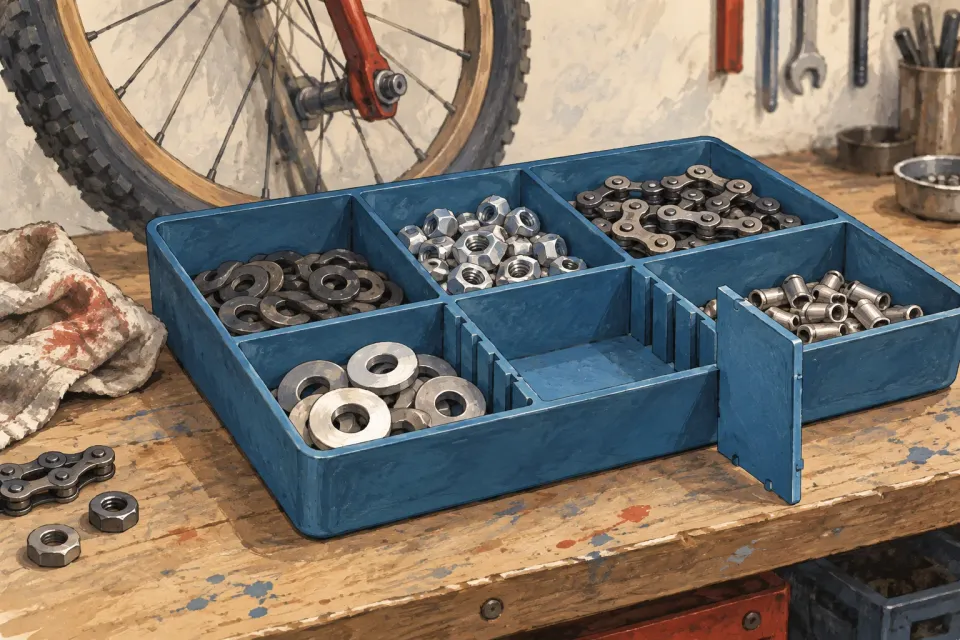
Consider an entirely fictional supplier of compartment storage trays. Its hypothetical customer is a bicycle workshop that needs to separate similar small parts beside a workbench. The image’s job is to show how movable dividers and labels can organise the parts. Its job is not to establish that the workshop works faster, sells more or avoids mistakes.
Define that use before choosing the setting. The guide to moving from product names to use cases helps articulate the need. Here, the need provides a recognisable visual scenario, without attributing an outcome to a customer.
Construct a scene that explains its own status
For the workshop example, show the tray on a simple work surface with a few different components and readable labels. Leave a compartment empty if that helps reveal the movable divider. The empty compartment then explains a product feature; it is not evidence that a real workshop has run out of stock.
List the purpose of each visible detail. The components demonstrate possible contents. The work surface provides context. The tray is the advertised offer. If tools, labels or contents are not included, arrange them so they do not appear to form a supplied kit. Use fewer props when their role would otherwise be unclear.
Label the scene with wording such as “Illustrative setup” or “Fictional use example”. Choose a label that matches what was made. An illustration of a possible situation is not an anonymised customer case. Calling it anonymised would suggest that a real customer and event exist behind the image.
Avoid adding an invented workshop logo, a named owner’s portrait or quotation marks that turn editorial wording into an apparent testimonial. Specific details can make a scene understandable without giving it a false source. A fictional scenario does not need the visual furniture of an endorsement.
Keep one case from becoming a typical result
Even an authentic customer photograph needs a narrow explanation. It may show that a product was used in one setting at one time. On its own, it does not establish how often other customers use it that way, what support was involved or what a new buyer will achieve.
When a real customer case is available, inspect its documentation before selecting the ad image. Which product version is visible? Did the customer create the arrangement? Which accessories came from other suppliers? Has use of this image and its accompanying description been agreed? Record the answers so the person assembling the ad does not have to infer them.
Wording such as “how our customers work” turns an individual example into a broader story. If the material supports only one situation, keep the description at that level. A composite made from several projects also needs an accurate explanation. It does not become a documented individual case merely because every element has a real origin.
Compare three possible directions
| Direction for the fictional tray supplier | What a viewer may understand | Editorial decision |
|---|---|---|
| Tray with parts, neutral work surface and visible example label | One possible arrangement of the compartments | Retain if the product and props have clear roles |
| Workshop name, stars and “our customers succeed” wording | A testimonial and recurring success | Remove when actual supporting material is absent |
| A real, approved photograph from a documented project | One customer’s actual setup | Describe that particular case and its conditions |
The distinction concerns the evidence behind the image, rather than which treatment looks more credible. A simple demonstration can be sufficient when the task is to explain use. Adding customer signals merely to make it more persuasive changes the story the viewer is being asked to believe.
One tray, four different stories
- Illustrative setup
A neutral work surface and example label show one possible way to arrange parts.
Checkpoint - Invented endorsement
A workshop logo, stars and owner quote turn the demonstration into an unsupported customer case.
Reconsider - Documented individual case
A real customer photo needs a known product version, context and agreed use.
- Implied typical outcome
The words “how our customers succeed” reach beyond what an individual photo can establish.
Reconsider
Read the image and copy together
A visible example label cannot resolve a headline claiming “the organisation our customers always achieve”. Read the image, headline and short ad body as one proposition. Use the claim evidence matrix for ad copy when the wording reaches beyond the supporting material.
Ask a reviewer to describe the scene without a spoken introduction. Then ask whether they think the business is real, whether someone is endorsing the product and whether a particular outcome seems typical. Their answers check comprehension; they do not establish how every recipient will respond.
OpenAI documents ad previews in its campaign management guidance. A preview shows appearance but does not confirm serving eligibility. Use the available preview to inspect whether the example label and product context remain understandable in the assembled ad.
Keep the scenario in its proper role
The illustrated need can also help the team describe the offer’s context. OpenAI’s targeting guidance explains that context hints can describe relevant uses and needs. They are not exact-match keywords, and the examples do not guarantee that a particular conversation triggers an ad.
Save a short explanation with the source material: fictional scenario or documented case, which details communicate the use, and which outcome the image does not establish. Then run a review of the image’s implied claims. The finished customer example should make the use easier to understand while keeping visible, constructed and documented information distinguishable.
Sources and scope
Select and label a customer scenario in ad creative so a demonstration, documented case and expected result remain distinguishable.
Working methods and examples are editorial suggestions. Check current platform requirements and available features before implementation.