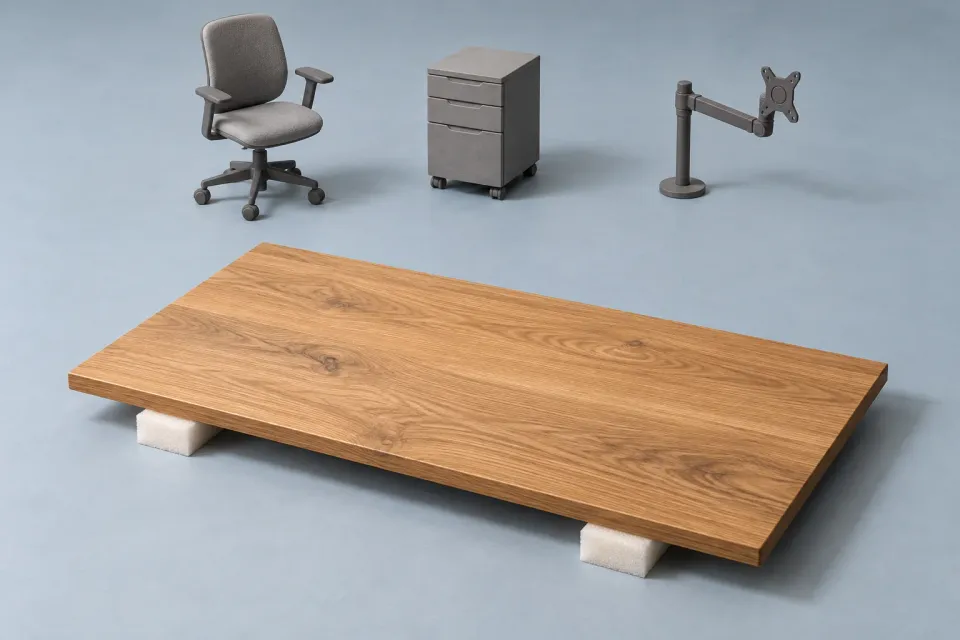
Imagine a fictional ad for a replacement tabletop, photographed as part of a furnished desk. The chair, monitor arm, drawers and cable tray may collectively look like the advertised package. If only the tabletop is included, an accurate headline does not automatically make the image clear. The visual has made its own suggestion about what the customer will receive.
For ChatGPT ad creative, review that suggestion before approving the artwork. This is a review of meaning, not a judgement about whether the photograph is attractive. A polished asset can still communicate the wrong product, package or result.
Read the picture without the copy
Hide the headline and ask a reviewer to describe the offer they think they are seeing. Do not explain the concept first. Note the nouns and outcomes in their answer. “A complete workstation” is different from “a replacement tabletop”. “A finished report” is different from “software for assembling a report”.
This exercise reveals possible interpretations; it does not establish how every viewer will respond. Use the interpretation to identify questions the team can check. If two reviewers disagree about which object is for sale, the composition may need a clearer visual hierarchy.
Then reveal the copy and ask what changes. Does the text resolve the uncertainty, or does it strengthen the broad interpretation? “Your new workspace” beside a fully furnished desk scene may amplify the idea of a complete package. A more precise headline may help, but it should not have to fight the dominant visual.
What does the desk image sell?
- The item
The offer concerns a replacement tabletop.
- The setting
Chair, monitor arm and drawers may look like one package.
Reconsider - Review question
Can the customer identify what is included without guessing?
Checkpoint
Inspect four types of implication
| Visual element | What it can imply | Review question |
|---|---|---|
| Several products arranged as one set | Everything shown is included | Which items are actually in the advertised offer? |
| A product beside a familiar object | A particular size or capacity | Is the scale accurate and useful? |
| A software screen displaying a result | That result is available through the advertised feature | Is this a real supported state or a conceptual mock-up? |
| A transformed room or completed project | The offer produces that outcome | What work, materials or conditions created the scene? |
Work through the rows relevant to the asset. A simple product photograph may need a careful inclusion check but no software-state review. A screenshot may require more attention to sample data than to physical scale. The audit should follow the image, not force every asset through an irrelevant checklist. When the question concerns size or capacity, check the product variant, measurements and visual reference before approving the scene.
Separate illustration from demonstration
An illustration can explain an abstract service without claiming to show an actual deliverable. Problems arise when the image looks like evidence of a result that has not been demonstrated. A diagram of a planning process and a polished finished plan serve different purposes.
For a fictional workshop service, consider an image of people arranging task cards. That can illustrate the activity. A graphic showing every team’s workload perfectly balanced implies an outcome. If the service is a facilitated discussion rather than a guaranteed reorganisation, the second concept needs particular care.
Ask the creative brief to name the image’s job. It might show the product, explain a step, illustrate an environment or display a genuine example. Naming the job helps the reviewer decide which facts require support. “Make it look successful” provides no useful boundary.
Check screenshots as product statements
A screenshot is not neutral decoration. Visible controls, labels and completed states can imply functionality. Confirm that the screen represents the advertised version and package. If the image is a composite, ask whether the combined elements could appear together in the product.
Use clearly appropriate sample data and remove information that should not be published. Do not place invented performance numbers into a dashboard and let them look like documented customer results. If the task is to show navigation, choose a view where the structure carries the message without relying on impressive figures.
Small labels can disappear at reduced display sizes. If a necessary “illustrative example” note becomes unreadable, the concept may still imply real evidence. Resolve the underlying ambiguity rather than assuming a tiny label will carry the whole explanation.
Review after the crop, not only before it
A crop can change meaning. It can remove the accessory label, hide the hand that establishes scale or isolate a successful result from the process that produced it. Treat the final composition as a new version to inspect.
Check the actual creative preview available to your workflow. OpenAI documents ad previews as a way to inspect appearance, while noting that a preview does not establish serving eligibility. The preview is also not a factual endorsement of the image. Your team still needs to substantiate the offer it communicates. Official campaign management documentation
Record feedback as an observable issue and a desired correction. “The arrangement looks like all four accessories are included; separate the advertised product from the styling props” gives a designer something to change. “Make it more honest” does not identify the visual problem.
Finish with the image, headline and body together. Confirm that they describe the same offer and that the picture has not reintroduced a promise removed from the copy. Use the ad-copy claim matrix for written statements and the use-case worksheet to check which real task the overall creative is meant to explain.
Sources and scope
Checking what an ad image implies about the advertised offer, independently of its written claims.
Working methods and examples are editorial suggestions. Check current platform requirements and available features before implementation.