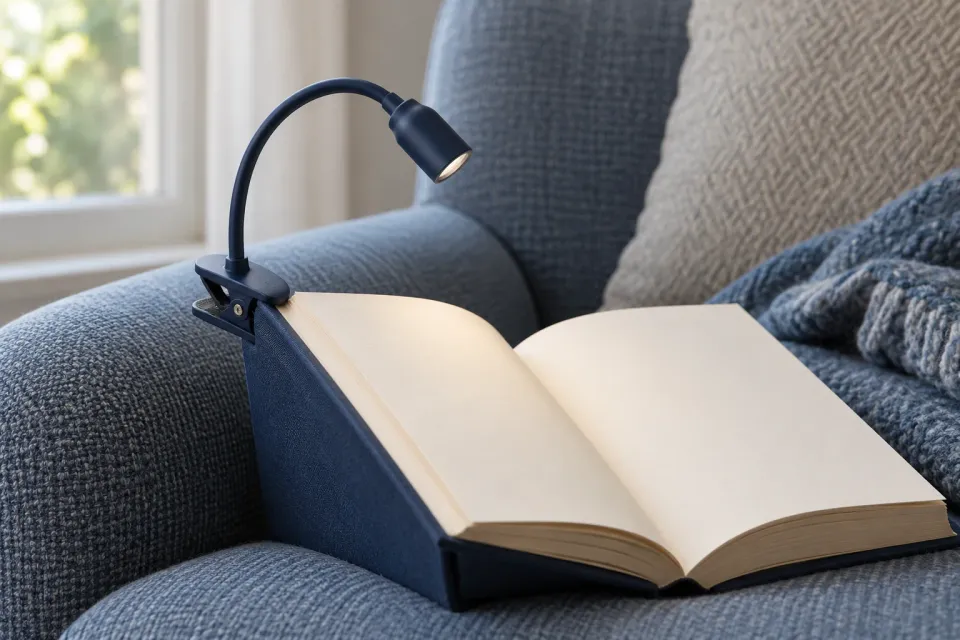
Removing background can make an image more focused. It can also remove the detail that explains the offer. A reading light attached to a book is understandable as a product. A tight crop showing only its head could look like part of a desk lamp.
When cropping images for ChatGPT ads, decide what may disappear before moving the frame. The aim is a useful composition that preserves the intended meaning. The method below is an editorial recommendation, not a statement about image dimensions or automatic cropping available in a particular advertising account.
Write down what the chosen image explains
Start with an image and an agreed communication task. Write one sentence describing what someone should understand without an explanation from the designer: “The light clips to the book cover and moves with the book.” That sentence gives you a way to assess whether a proposed crop preserves the essential relationship.
In this fictional example, the original photograph contains a book light, an open book, a side table and a coffee cup. The offer is the light. The image needs to explain its attachment, so the clip and its contact with the book must remain visible. The cup helps establish a setting but does not explain the selected function.
If the team is still choosing between photography and illustration, settle that decision first. The guide to choosing a visual medium for the ad’s task addresses that choice. Cropping can clarify a suitable image, but it rarely repairs a source that never contained the information the viewer needs.
Separate essential content from expendable space
Mark three kinds of area on a working copy. The first contains information that must survive. The second contains supporting context needed only if the central message would otherwise become unclear. The third contains material that can leave the frame without changing the explanation.
For the book light, protect its recognisable shape, the clip and enough of the cover to show the attachment. The remaining pages provide orientation. The far edge of the side table and the cup are candidates for removal. These boundaries belong to this image; they are not a universal safe area.
Mark relationships as well as objects. Keeping two parts inside the frame is insufficient if their connection disappears. A visible clip without its grip could resemble a separate accessory. Leave enough space around the contact point to make the shape understandable, without turning that judgement into an invented percentage rule.
Compare crops with different trade-offs
Prepare a few visibly different working crops. Keep the photograph and ad copy constant during this comparison so you can judge what the crop changes. Use descriptive names such as “reading setting”, “light with attachment” and “light head”, rather than naming a favourite “final”.
| Crop in the fictional example | What remains visible | Editorial decision |
|---|---|---|
| Whole reading setting | Product, book, table and cup | Check whether the setting overwhelms the attachment |
| Light, clip and book edge | Product and its contact with the book | Retain as a candidate for explaining the function |
| Light head alone | A detail without its attachment | Reject for this communication task |
The widest crop may work when the surroundings matter. The tightest may work for another concept, such as showing a surface finish. Your decision therefore belongs to the selected image task. Moving closer is not automatically an improvement.
Which crop explains the book light's attachment?
- Whole reading setting
Book, light, table and cup remain. The attachment survives but competes with the setting.
- Light with contact point
The clip and book cover remain together. The crop preserves the function the image should explain.
Checkpoint - Light head alone
The shape remains but its attachment disappears. The product could look like another kind of lamp.
Reconsider - Saved crop instruction
Keep the whole clip and its contact with the book cover. The far table edge may disappear.
Checkpoint
Inspect the assumptions created by each edge
Review each candidate without copy first, then beside the intended headline. Describe only what is visible. If you need to refer to the original photograph to explain how the light attaches, the crop has removed something essential.
Pay particular attention to objects cut at a point where their function changes. A clipped handle may become an ambiguous shape. A cropped arrow may lose its destination. A label may retain a number while losing the unit that explains it. Move the boundary or choose another source if the relationship cannot survive.
Then ask what the new crop implies about the offer. Use the visual claims review for ad images when removing material changes the apparent contents or function. This crop review identifies the change; the broader claims review evaluates the resulting promise. Keeping those decisions separate makes revisions more precise.
Work within the information the source contains
Screenshots also depend on relationships. An output may become misleading if the crop removes the selected view or the step that explains it. Start with selecting a relevant screenshot, then retain the smallest coherent view that still shows the advertised task.
If the desired composition requires space the source does not contain, record that as a new production need. Extending a background or relocating an object changes the source and requires review as an edited image. Preserve the original so another producer can distinguish cropping from other changes.
Context hints do not repair an unclear composition. OpenAI describes them as additional information about products, uses and needs associated with ads; they are not exact-match keywords or a promise of delivery in a particular conversation. See the targeting documentation. Our editorial conclusion is that the image’s explanation needs its own review.
Leave a decision another producer can repeat
Record the source file, selected crop and elements that must remain. For the book light, the note might read: “Keep the whole clip and its contact with the cover. The far table edge may disappear.” That instruction is more useful than asking someone to “tighten the image”.
Check the current file requirements in the tool receiving the asset. Use an available ad preview to inspect the assembled image and copy. OpenAI explicitly distinguishes reviewing appearance from confirming delivery eligibility in its campaign management documentation. A satisfactory crop does not establish either delivery or a particular placement.
Save the reviewed export beside the crop decision. If the image or its boundaries change later, review that change again. The useful outcome is a repeatable composition in which the product’s meaning survives the edges you selected.
Sources and scope
Choose and document image crops that preserve the ad image's intended meaning when parts of the original are removed.
Working methods and examples are editorial suggestions. Check current platform requirements and available features before implementation.