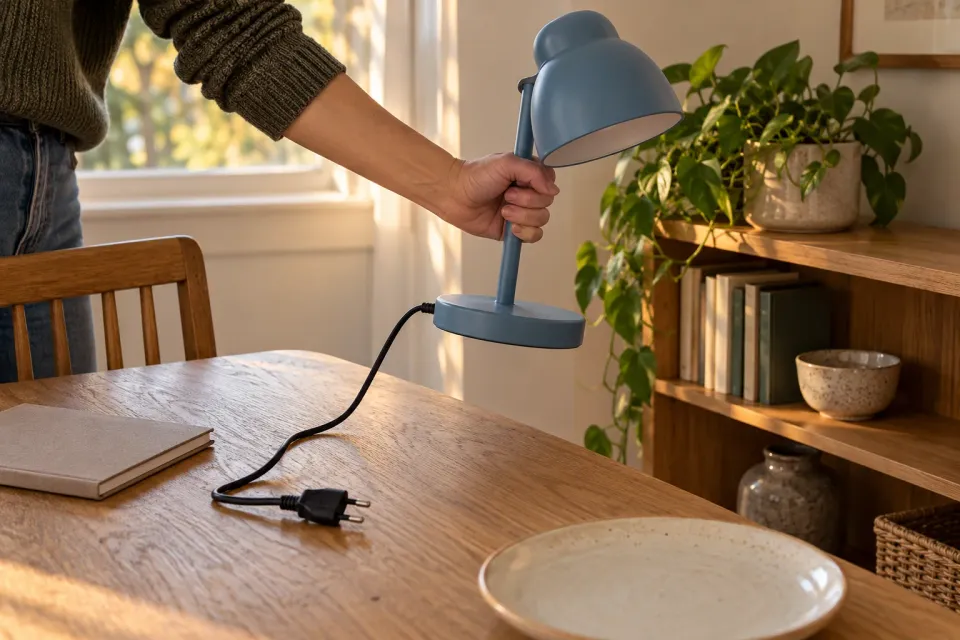
An image brief that asks for “a modern home with the product in focus” leaves most of the meaning to whoever makes the image. A ChatGPT ad needs a more useful instruction: show the use that makes this product relevant. A lamp presented as decoration means something different from a lamp lighting detailed work or being moved out of the way after work ends.
Start with a use case that the team has already chosen. This guide translates it into production instructions. If the team is still deciding what the image should communicate, use the guide to giving a creative brief one job first. The question here is how that agreed job becomes a scene through objects, action and setting.
Describe the situation without styling language
Imagine a fictional lighting company advertising a small task lamp to people who work at a table also used for meals. “An inspiring home” does little to explain the need. “A work area needs to be cleared when the table is used for dinner” gives the producer something observable to represent.
Use a few sentences to identify the activity, its practical constraint and the product’s relevance. Avoid burying these facts beneath a detailed lifestyle portrait. A person’s occupation, age or taste in furniture belongs in the brief only when it changes the meaning of the scene. Otherwise it distracts from the action that needs to be understood.
If the connection still feels weak, return to translating a product into a use case. An image brief should not invent an advantage to rescue an attractive idea. Establish which actual, available product property makes this scene appropriate before asking someone to photograph, illustrate or otherwise produce it.
Choose the moment that explains the use
The lamp could be resting on the table, illuminating work or moving onto a nearby shelf. For this use case, the movement is a useful moment to investigate. A hand lifting the lamp can explain why a manageable shape and small base matter. A still life next to a laptop leaves more of that reasoning unstated.
Describe what happens immediately before and after the picture, while choosing one moment to depict. Before: work materials occupy the table. During: the lamp is moved away. After: the table is ready to be set. This short sequence prevents the producer from trying to show the entire story at once, with the product’s role lost among competing details.
The action must also be physically plausible. If the lamp uses a power cable, say how that cable is handled. Hiding it may suggest battery operation. That is a more consequential mistake than a slightly untidy composition. Preserve the relevant connection or choose a different moment that does not create the false impression.
Separate visible instructions from factual references
The producer needs to know what viewers should notice and which materials govern the details. Keep two distinct parts in the working brief. The visible instructions might mention the hand position, lamp base, edge of the table and shelf. The factual references identify the model, colour, measurements and power connection.
For the fictional lamp, the scene brief could contain these fields:
| Field | Instruction |
|---|---|
| Situation | A work table needs to become a dining table again |
| Action | The lamp is lifted away after work finishes |
| Essential detail | The base and power connection match the current model |
| Setting | An ordinary table with enough space for the movement |
| Avoid | Any implication of battery operation or an included wall fitting |
Attach the product references instead of asking the producer to find a similar model independently. Mark an uncertain feature as a question to resolve. A broad instruction to make everything “authentic” will not tell someone which connection, hinge or control needs to be checked before the image is approved.
From a shared table to a clear scene
- Situation
The dining table is used for evening work and then needs to be set.
- Action
A hand moves the actual lamp model from the work surface to a shelf.
- Detail
Keep the grip, base and power connection accurate so the scene invents no feature.
Reconsider - Acceptance
The scene must explain moving the lamp without implying cordless operation.
Checkpoint
Decide what the props communicate
A cup, book or laptop can make the setting understandable. Extra objects can also make the ad look like an offer for a bundle of products. Identify which objects are context and which belong to the actual offer. If that distinction will not be apparent in the finished image, simplify the arrangement.
Choose props that serve the action. One notebook may be enough to establish the work setting when the lamp is being moved away. Several monitors, headphones and expensive furniture may shift the picture towards a general technology advertisement. Each object should have a reason for appearing beyond making an empty part of the frame look busier.
State exclusions as production instructions too. An ambiguous outdoor setting could imply that an indoor lamp is suitable for weather exposure. A shelf bracket could look like an included mounting accessory. Review the meaning of the environment as carefully as its colours. These are image interpretation decisions, not campaign targeting exclusions.
Give production the rest of the ad
OpenAI describes a standard chat card through its image, title, body and destination. Campaign Management
Include the intended title and destination in the working brief so the producer can check the image against them. This does not mean copying all the wording into the asset. It means noticing when the headline names one model while the reference depicts another, or when the scene demonstrates a use that the offer does not support.
Hints add context without exact keyword matching or guaranteed placements. The chosen scene remains a message hypothesis. Targeting
Write the acceptance questions before production
Finish the brief with questions that a reviewer can answer from the result. Is the movement understandable? Is the correct lamp identifiable? Does anything suggest a missing feature? These questions make feedback more actionable than “more premium” or “give it energy”, because they explain what has to change and why.
When proposals arrive, connect requested revisions to those questions. A different camera position is justified if the grip disappears. It is less useful when it merely reflects a reviewer’s personal preference. Use the final creative selection process when several completed proposals genuinely answer the same brief.
Keep the agreed scene and its product references together. A future revision can then preserve the reasons for the cable, table edge and hand position instead of stripping them away as incidental decoration. That record is the practical value of the brief: it carries the intended meaning into the next production decision.
Sources and scope
Translate an already chosen use case into an actionable scene brief for a ChatGPT ad image.
Working methods and examples are editorial suggestions. Check current platform requirements and available features before implementation.